Watercolor Pet Portraits: Keep the Pet, Leave Out the Clutter
PhotosLux ·
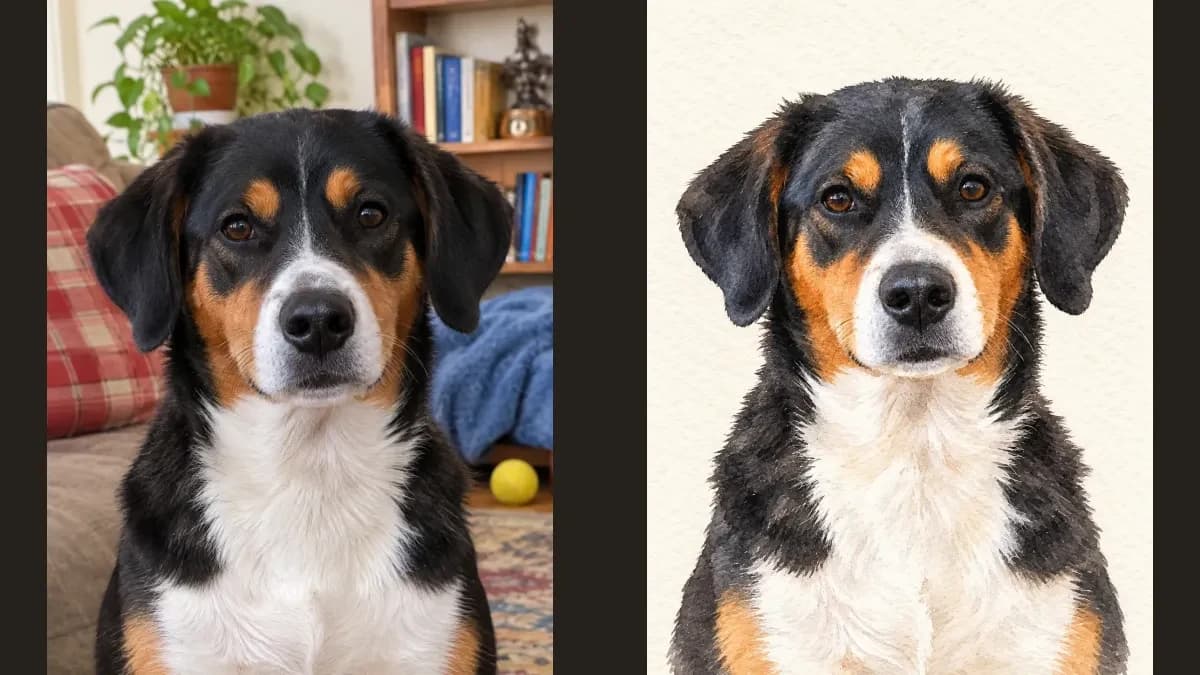
A busy room does not have to become part of a watercolor pet portrait: keep the pet’s visible identifying features in focus and ask for irrelevant furnishings to be replaced with pale paper. If objects hide the pet or obscure important markings, choose a clearer source photo rather than expecting the illustration to reconstruct what cannot be seen.
Decide what should lead the portrait
First, choose the subject emphasis: for a head-and-chest portrait, the face, ears and visible chest can carry more of the image than the room around them. A quieter background helps direct attention without needing to describe every object in the photo.
Next, pick identity cues that are actually visible in the source. Fur patches, ear shape and expression can help the illustrated pet remain recognizable. Treat these as priorities to check, not details an image transformation can guarantee.
Finally, decide whether the setting matters to the memory. A distracting cushion or scattered objects can be omitted; a meaningful place may be suggested with just a few soft, recognizable shapes. If furniture covers the pet or hides a marking you care about, use a clearer photo instead.
Worked decision: a tricolor dog in a busy room
Imagine a clear head-and-chest photo of a fictional mature dog. The anchors to carry into the artwork are floppy black ears, a white muzzle and chest, and rust-colored eyebrows. In the room, a plaid cushion, blue blanket, books and yellow ball compete for attention, but none is important to the portrait.
The decision is to keep those visible dog features as the subject cues and replace the whole living-room setting with plain pale paper. The watercolor treatment should apply to the dog as well as the background; the goal is not a sharp photographic face pasted onto a painted patch.
Choose a background with a purpose
Plain pale paper is the choice when you want the pet’s face, ears and markings to carry the composition. It gives the busy source a quieter destination without introducing new scene details. For the worked dog example, this is the selected direction.
A few soft place shapes are a different option when the setting is part of the memory. You might keep a gentle hint of a familiar cushion or room colors while leaving out unrelated objects. This is an alternative to consider in words, not a second generated result in this example.
Use one concise request
A copyable request for the selected plain-paper direction is: “Paint the dog in watercolor, keeping its floppy ears, white muzzle and chest, and rust eyebrows recognizable. Replace the room with plain pale paper. No text.”
In PhotosLux, Custom Style has one required request field with a 200-character limit and an optional reference image; no reference is used here. Put all desired changes in the request: this workflow has no separate extra-preferences field or watercolor preset. Upload one JPEG, PNG or WebP image up to 20 MB. Framing follows the source automatically.
Inspect the portrait, not just the background
When reviewing the result, check whether the dog’s ears, white muzzle and chest, and rust eyebrow patches remain recognizable, and whether the silhouette is readable. Look across the whole image to see if the dog itself has a coherent painted watercolor treatment, with the room replaced by quiet pale paper.
This is one synthetic source and one actual PhotosLux result, not a handmade painting, a controlled comparison of two backgrounds, or proof of exact likeness. Check the actual markings and painted appearance rather than assuming the request preserved them perfectly. The image is an illustration, not a physical print or a guarantee of how a printed result will look.
Illustrative example
Illustrative example: a watercolor dog on pale paper
The synthetic source is a 3:4 head-and-chest photo of a fictional mature mixed-breed dog in a busy living room. The dog has floppy black ears, a white muzzle and chest, and rust eyebrow patches. The request turns the dog into a watercolor and replaces the room with plain pale paper. Both complete frames are shown. Inspect the actual result for recognizable markings, a readable silhouette, a painted dog and a simplified background. Both images are AI generated, not customer evidence; outcomes vary.
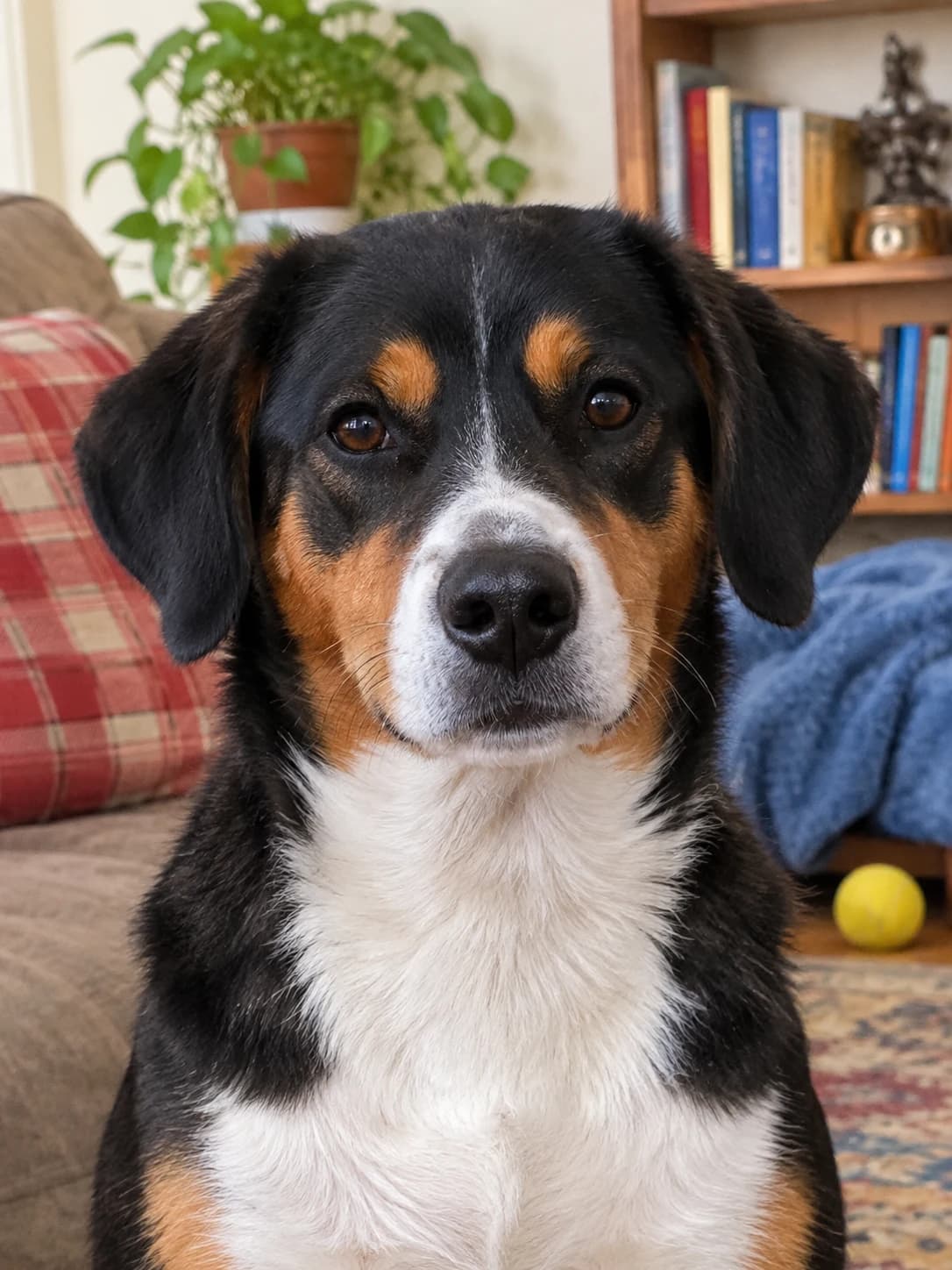
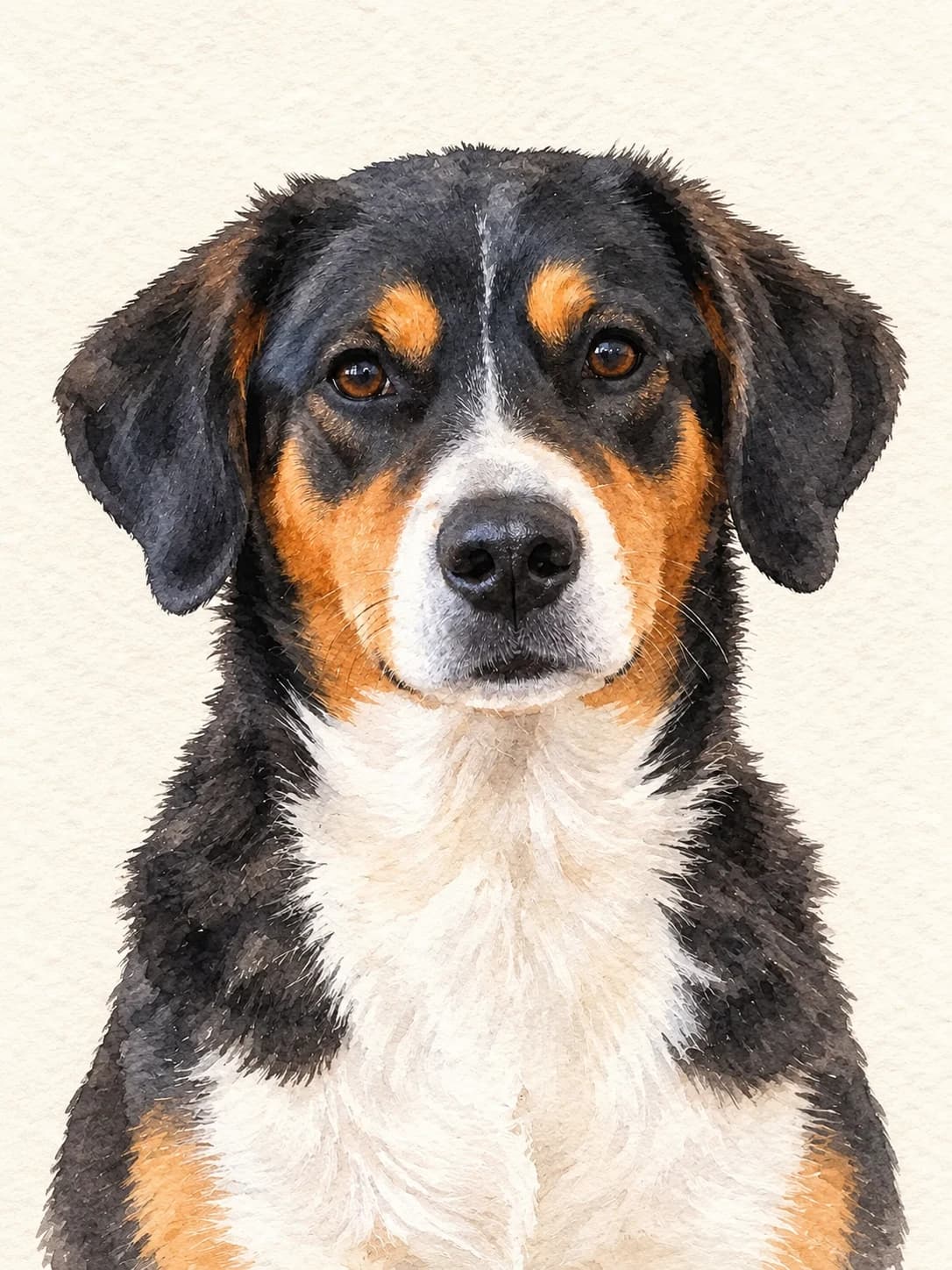
Paint the dog in watercolor, keeping its floppy ears, white muzzle and chest, and rust eyebrows recognizable. Replace the room with plain pale paper. No text.
Both images are AI generated and show the fictional dog and setting described in this example. This is an illustrative example, not a customer before-and-after photo; outcomes vary.
FAQ
Should the pet stay photographic on a watercolor background?
For a watercolor illustration, ask for the pet itself to be painted too. Otherwise the result may read as a photographic face placed over a watercolor-looking background rather than one coherent artwork.
What if the room is meaningful rather than clutter?
Ask for a few soft, recognizable setting shapes instead of a plain background. Keep only the parts of the place that matter to the memory; this is a written alternative, not a second result shown here.
Can a generated portrait guarantee my pet’s exact markings or a print-ready result?
No. Review the actual image for visible markings and likeness, and treat it as a digital illustration concept. It does not guarantee exact details or how a physical print will look.